
This SOP outlines the standard guidelines for key fields in all new HubSpot tasks to ensure consistency, efficient tracking, and appropriate prioritization and follow-up.
Any task fields not explicitly mentioned in this SOP are not needed.
Task Title
Standard Format: [Team Name or Abbreviation] - [Task Title]
| Component | Description | Example |
| Team Name/Abbreviation | A prefix identifying the department assigned to the task. |
MS (Media Strategy), OS (Organic Social), CS (Creative Services), Ops, Web, or SEO |
| Task Title |
A brief, descriptive title of the specific request or action item. |
Creative Requests or Copy Updates |
- Automatic Association: Tasks are created at the child company level, which automatically associates the task with the correct company, removing the need for company names in the title.
- Tracking and Filtering: The team prefix (e.g., MS, SEO) allows for easy tracking and filtering by department.
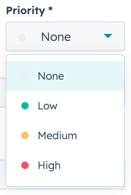
Priority
Standard Selection: Account Manager's (AM) discretion.
Associate with Company Records
Standard: Associate the task with the child company/companies. If the task is for an entire portfolio, associate it with the parent company.
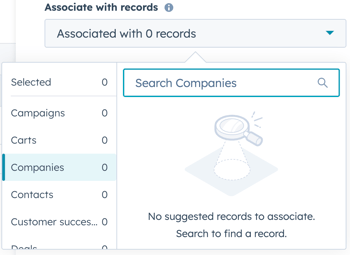
- Note: Creating the task from the child company in HubSpot will automatically associate the task with that company.
- The most common creation points are: directly in HubSpot tasks, child company records in HubSpot, and using the HubSpot extension in Gmail.
Assign to Team Member
Standard: Assign the task to the department head. The department head will then reassign it to specialists if needed.
Due Date and Turnaround Time
Standard Turnaround: A three (3) business day turnaround is the standard for most typical tasks.- Urgent Tasks: Account Managers have the discretion to shorten the due date to two (2) days for high-priority items, such as critical errors or when a client is upset.
- Maximum Timeframe: The expectation is to complete the task within a week (seven calendar days), though this is negotiable with the assigned team.
Reminder
Reminders are set based on the task's priority and the client's needs.
Standard:
- When to set a reminder (AM Discretion):
- The task is highly important and critical.
- The client is urgently waiting for the item.
- The client is "freaking out" or the task is needed ASAP.
- When to omit a reminder:
- Reminders are generally not needed for standard tasks, as the team is expected to manage their task list and priorities.
Task Note
The Task Note should provide necessary context and action items for the assignee.
Standard Structure:- Action item (main request).
- Additional context.